

.png)
.png)
Stock levels and stock status are two key concepts in inventory management that every Shopify store owner needs to understand. Here's the difference:
- Stock levels: The total number of units you have for a product across all locations (e.g., warehouses, stores).
- Stock status: The condition or availability of those units, categorized as available, committed, unavailable, or incoming.
Why does this matter? Mismanaging these metrics can lead to costly mistakes like stockouts or overstocking. For example, stockouts cost businesses $1.2 trillion annually, while excess inventory in the fashion industry alone results in $70–$140 billion in lost sales each year.
By tracking both stock levels and stock status, you can:
- Avoid overselling or running out of stock.
- Make smarter purchasing decisions.
- Improve efficiency across multiple sales channels.
Platforms like Forstock simplify this process with real-time dashboards, demand forecasting, and automated purchase orders, helping you save time and reduce errors.
Key takeaway: Stock levels show "how many" units you have, while stock status reveals "how" those units are allocated. Together, they ensure accurate inventory management and smoother operations.
What Are Stock Levels?
Definition and Examples
Stock levels refer to the number of units you have for a particular product across all locations - whether that’s a warehouse, retail store, or even items in transit. For instance, if you have 100 units stored in Warehouse 1 and 50 units in a retail store, the total stock level for Product A would be 150 units.
How you measure stock levels depends on the system you use. Perpetual tracking systems update inventory in real time with every transaction, while periodic systems rely on scheduled physical counts, which can sometimes result in discrepancies. Many Shopify businesses rely on barcode systems, which offer over 95% accuracy, or RFID technology, which can achieve an impressive 98%–99.9% accuracy.
These precise measurements are essential for making informed decisions and ensuring smooth operations.
Impact on Business Operations
Accurate stock tracking is the backbone of smart business management. Knowing exactly how much inventory you have allows you to set reorder points, ensuring you don’t run out of popular products, and determine maximum stock levels to avoid overstocking and tying up cash unnecessarily. This is especially important given that warehouse space has become more expensive, with costs rising by more than 27% between 2017 and 2024.
On the flip side, poor inventory tracking can lead to costly mistakes. For example, audits in grocery stores have shown that fixing inventory errors can boost sales by as much as 11%. In contrast, inaccurate stock records have contributed to the fashion industry’s excess inventory problem, with an estimated 2.5–5 billion unsold items in 2023, translating to $70–$140 billion in lost sales. Maintaining synchronized stock levels also helps prevent double-selling across multiple sales channels, which is crucial for maintaining customer trust.
"Inventory tracking is the systematic monitoring of stock quantity, location, and status across all your sales channels and storage areas." - Shopify Staff
What Is Stock Status?
Definition and Examples
Stock status goes beyond simply counting how many units you have - it tells you the condition of those units and whether they’re actually available for sale. It provides a real-time snapshot of your inventory, offering a clearer picture of what’s ready to sell and what’s not.
Shopify organizes stock status into five distinct categories:
- On hand: Total units physically in your possession.
- Available: Units ready and available for sale.
- Committed: Items reserved for orders that are placed but not yet fulfilled.
- Unavailable: Units set aside for reasons like draft orders, defective items, or safety stock.
- Incoming: Products on their way from suppliers but not yet received.
For example, if you have 200 units of Product B on hand, only 120 might be available for new sales because 60 are already committed to existing orders, and 20 are unavailable due to quality issues.
"An inventory status is a real-time snapshot of a retailer's stock. It includes various categories of availability for sale, their allocation to specific orders or transfers, and the transit status between locations." - Shopify Staff
This level of detail helps avoid situations where products are incorrectly listed as "in stock" when they’re already reserved or in transit. Such errors can lead to overselling, frustrated customers, and operational headaches. By breaking inventory into these precise categories, Shopify ensures merchants can manage their stock effectively and avoid potential pitfalls.
How Stock Status Affects Shopify Stores

Accurate stock status isn’t just a technical detail - it’s a cornerstone of smooth operations for Shopify stores. It streamlines order fulfillment and helps customers make informed decisions by clearly showing which products are available, incoming, or temporarily out of stock. This is especially important when 78% of U.S. shoppers encounter out-of-stock products, which can cost businesses up to 8% of their revenue.
The financial impact becomes even clearer when considering inventory distortions, which include both stockouts and overstock. Together, these issues cost businesses over $1.7 trillion globally each year. For Shopify merchants, precise stock tracking is also critical for offering services like "Buy Online, Pick Up In-Store." If a system mistakenly shows an item as available when it’s already committed, customers may arrive at your store only to leave empty-handed - a frustrating experience for everyone involved.
Some Shopify stores take advantage of their stock status by enabling backorders for incoming inventory. This allows loyal customers to secure their purchases even before the products arrive. Additionally, savvy merchants use "Back in Stock" notifications to re-engage customers when items are restocked, turning potential missed sales into future opportunities.
Inventory Management Explained in 7 Minutes (Definition, Techniques & How to) | Unleashed
Stock Levels vs. Stock Status: Key Differences
Stock Levels vs Stock Status: Key Differences in Inventory Management
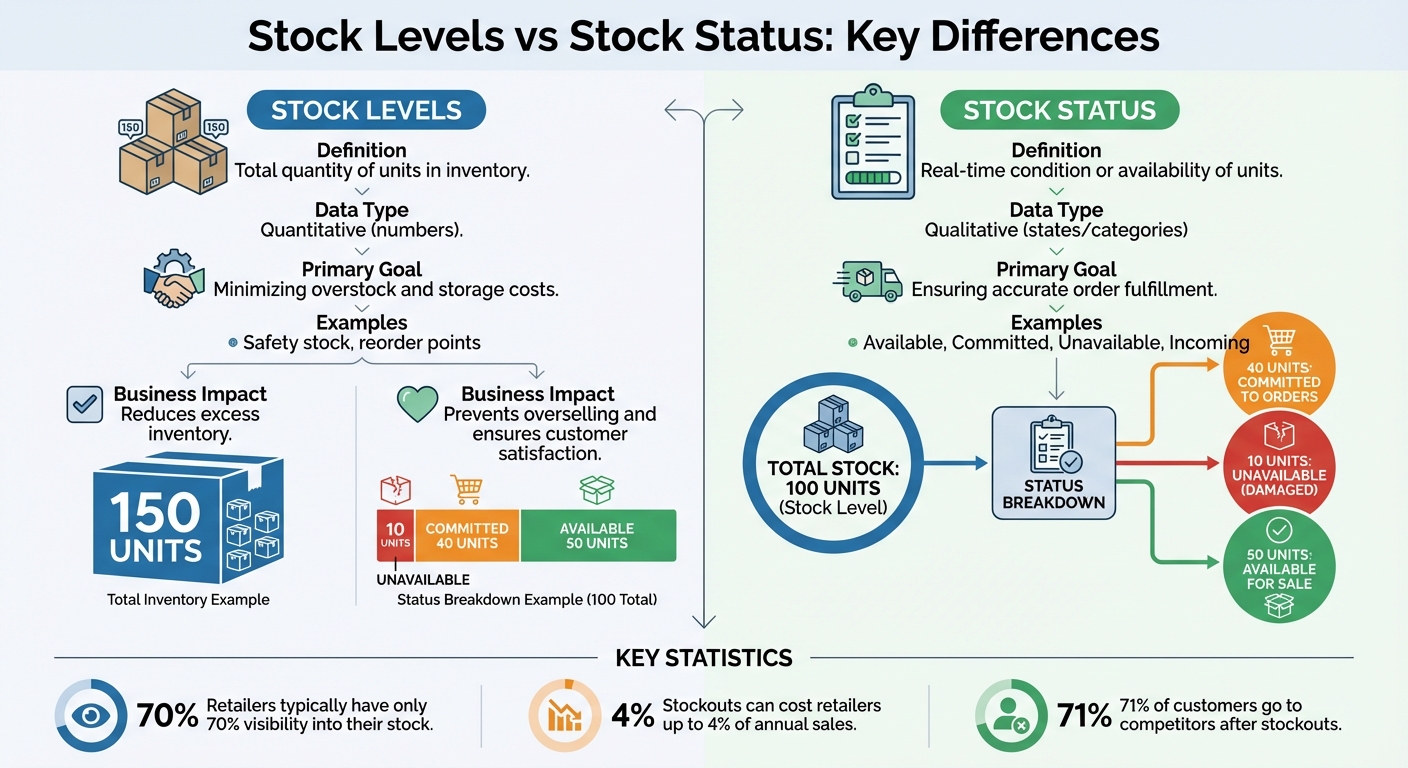
Stock levels and stock status might sound alike, but they play very different roles in inventory management. While stock levels focus on the numbers - how many units a business has - stock status deals with the condition or availability of those units. Think of stock levels as the "what" and stock status as the "how" of inventory.
Stock levels provide the raw data: quantities that help businesses manage replenishment and storage. On the other hand, stock status categorizes inventory into states like Available, Committed, Unavailable, or Incoming. These categories tell you whether those units are ready to sell or tied up elsewhere.
Why does this distinction matter? Because inventory accuracy is often less than perfect. Retailers typically only have about 70% visibility into their stock, leaving a 30% gap that can lead to missteps. That uncertainty can translate into overstocking, missed sales, or unhappy customers.
Comparison Table
Here's a quick breakdown of how stock levels and stock status differ:
| Feature | Stock Levels | Stock Status |
|---|---|---|
| Definition | Total quantity of units in inventory | Real-time condition or availability of units |
| Data Type | Quantitative (numbers) | Qualitative (states/categories) |
| Primary Goal | Minimizing overstock and storage costs | Ensuring accurate order fulfillment |
| Examples | Safety stock, reorder points | Available, Committed, Unavailable, Incoming |
| Business Impact | Reduces excess inventory | Prevents overselling and ensures customer satisfaction |
How They Work Together
To get the full picture, you need both metrics working side by side. For example, your system might show 100 units in stock. But when you look closer at the stock status, you realize 40 units are already committed to customer orders, and 10 are damaged or otherwise unavailable. That leaves just 50 units ready for sale. Without this insight, you might think you have plenty of stock - until you start overselling and disappointing customers.
Tracking both stock levels and stock status ensures smoother operations. Ignoring one or the other can lead to costly mistakes. Stockouts, for instance, can cost retailers up to 4% of their annual sales and drive 71% of customers to competitors. By combining these metrics, you can avoid stockouts, manage inventory more effectively, and keep customers happy.
This integrated approach is a cornerstone of platforms like Forstock, which help Shopify users optimize inventory management by bridging the gap between stock levels and stock status.
sbb-itb-f0fc809
Why Stock Levels and Stock Status Matter for Shopify Brands
Getting stock levels and stock status right isn’t just about keeping your inventory organized - it’s about protecting your profits, keeping customers happy, and running your operations smoothly. When you track these metrics accurately, you avoid two major pitfalls: running out of stock when customers need it and overstocking, which ties up your cash in unsold goods. Mastering this balance is key to fine-tuning your inventory strategy across the board.
Preventing Stockouts and Overstock
Stockouts are costly. If a customer can’t find what they’re looking for, 34% of them will abandon your brand after just one bad experience. On the flip side, overstocking drains your resources. In the U.S., retailers typically hold $1.35 in inventory for every $1.00 in sales, and with warehouse costs continuing to rise, every extra unit sitting idle adds to your expenses.
Tracking stock status accurately helps you avoid these issues. For example, if your system shows 100 units in stock, but 40 are already committed to orders and 10 are damaged, you’ve only got 50 units available for new customers. Setting reorder points - calculated by multiplying your average daily sales by lead time and adding some safety stock - ensures you restock before running out. Fashion retailer Rebecca Minkoff demonstrated this by using RFID tags to track inventory automatically, achieving 99% inventory accuracy and eliminating guesswork that can lead to stockouts or overordering.
Managing Multi-Location Operations
If you’re running multiple warehouses or retail locations, things get more complex. Without a unified system, one location might face stockouts while another has excess inventory. Real-time tracking of stock levels and status allows you to shift inventory between locations using stock transfers, reducing the need for unnecessary new purchases.
This is especially important for services like Buy Online, Pick Up In-Store (BOPIS). Customers need accurate, location-specific stock details - not just a generic "in stock" message. Guillaume Jaillet, Chief Omnichannel Officer at Oak + Fort, explained the challenge:
"We go through constant inventory fluctuations and shifting demands. It was hard to reliably and accurately represent which stores had certain items in stock to our digital customers when they wanted to try something on".
By streamlining their operations, Oak + Fort cut 50 hours of staff labor per week and reduced operating costs by 47%.
Smart order routing takes this a step further, using location data to fulfill orders from the warehouse closest to the customer. This reduces shipping costs and speeds up delivery. It’s a big deal, considering that 92% of shoppers are more likely to return to stores that offer fast delivery. Automated inventory management can also reduce fulfillment errors by 30% and improve shipping times by 25%.
Making Data-Informed Decisions
Tracking stock levels and status doesn’t just help with day-to-day operations - it gives you the data you need to make smarter purchasing decisions. Metrics like inventory turnover, sell-through rate, and days on hand show you which products are selling well and which are tying up your cash.
Tools like ABC analysis let you focus on high-revenue items while managing lower-priority products more efficiently. You can also calculate your lost sales ratio using the formula (Number of lost sales / Total potential sales) x 100 to understand the revenue impact of stockouts.
Take Allbirds, for example. After adopting a unified inventory system, they optimized their store stock levels, allowing them to carry less inventory while operating with smaller retail spaces. Travis Boyce, Head of Global Retail Operations at Allbirds, shared:
"With Shopify Plus, we have our point-of-sale and ecommerce systems under one umbrella, which serves our ultimate purpose of being an omnichannel retailer and viewing the customer as one customer - no matter where they shop with us".
Platforms like Forstock make these data-driven decisions even easier. With a unified dashboard, you get real-time stock visibility, automated reorder suggestions, and 12-month demand plans. Using tools like AI-powered forecasting, Forstock helps you adapt to sales trends, lead times, and seasonal changes - eliminating the need to juggle spreadsheets and reducing costly mistakes.
Using Forstock to Monitor Stock Levels and Stock Status
Managing inventory effectively starts with accurate stock tracking, and Forstock takes this a step further with tools designed to simplify the entire process.
Forstock integrates seamlessly with Shopify, pulling together real-time stock data, supplier details, and demand forecasts into one easy-to-use dashboard. Setup is quick, taking just two minutes, and immediately provides a clear view of your inventory in real time.
Real-Time Dashboards and Analytics
Forstock's dashboard centralizes all the key metrics you need, replacing the chaos of Excel sheets, Shopify reports, and scattered emails. It highlights critical areas like items that need reordering, overstocked inventory, and potential dead stock. You can filter the data by location, category, or date to identify inefficiencies and make informed decisions.
The platform also features a Performance Leaderboard that showcases your top five products based on units sold, revenue, and profit. This feature has delivered tangible results for businesses like HomeGoods, which reduced excess inventory by 45% and unlocked $150,000 in working capital.
AI-Powered Demand Forecasting
Forstock’s AI tools take the guesswork out of inventory planning. By analyzing live data - such as current sales trends, seasonality, and supplier lead times - it provides accurate demand forecasts and reorder recommendations. Unlike static spreadsheets, these forecasts are updated daily, factoring in variables like sales velocity, marketing campaigns, and shipping delays.
This dynamic approach can cut stockouts by 30% and reduce overstock levels by 15% in just one quarter. It’s a game-changer for purchasing decisions, ensuring they’re based on real-time insights.
"Forstock has been great. We're preventing stockouts that were costing us $50K monthly. The AI predictions are incredibly accurate." – Matt, Operations Lead at TechGear.
These insights naturally pave the way for smarter supplier management.
Automated Purchase Orders and Supplier Management
Forstock automates purchase order creation when inventory reaches set thresholds, eliminating the need for manual tracking and calculations.
"Automated PO creation saved his team over 10 hours every week." – Alexander, Supply Chain Manager at FashionCo.
The platform doesn’t stop there - it centralizes supplier management, enabling you to monitor supplier performance, manage lead times, and track order statuses all in one place. This level of automation reduces manual tasks by 60%, freeing up your team to focus on more strategic inventory decisions.
Conclusion
Grasping the difference between stock levels and stock status is crucial for protecting revenue and managing cash flow effectively. While stock levels tell you how many units are available, stock status clarifies where those units are and whether they’re sellable. Together, these metrics create the backbone of smart inventory management, helping businesses avoid the pitfalls of stockouts and overstock.
The financial impact of these distinctions is hard to ignore. Inventory visibility issues remain a challenge for retailers, yet addressing these inaccuracies can boost sales by nearly 11%. For example, in the fashion industry, excess inventory accounted for an estimated $70 billion to $140 billion in lost sales during 2023. These aren’t minor inefficiencies - they’re critical gaps that Shopify brands must address to stay competitive.
Fortunately, modern tools now simplify this process. Transitioning from outdated spreadsheets to automated, real-time inventory systems is no longer optional - it’s essential. Data-driven decision-making replaces guesswork, enabling brands to make smarter purchasing choices. Platforms like Forstock consolidate these capabilities, offering features such as real-time dashboards, demand forecasting, and automated purchase orders. These tools empower businesses with a unified view and proactive inventory management, as discussed earlier.
Key Takeaways
- Stock levels represent the total quantity of units available, while stock status indicates their condition and availability (e.g., available, committed, incoming, or unavailable). Together, they provide complete inventory transparency.
- Accurate inventory tracking across online stores, physical locations, and marketplaces is essential to prevent revenue loss from stockouts - which are projected to cost businesses $1.2 trillion globally in 2024 - and to avoid overselling that can damage customer trust. It also releases capital tied up in unsold inventory.
- By adopting tools like automated reorder points, maintaining safety stock, and leveraging forecasting systems, Shopify brands can transform inventory from a burden into a growth-driving asset.
FAQs
What are stock levels and stock status, and how do they affect my Shopify store's profitability?
Stock levels represent the amount of each product (SKU) you have on hand, while stock status reflects the real-time availability of those products - such as in stock, low stock, backordered, or out of stock. Both are essential for managing your Shopify store’s performance and profitability.
If your stock levels are too high, you could tie up valuable cash in surplus inventory, face higher storage costs, or even deal with markdowns or waste - especially for items with seasonal demand. On the flip side, low stock levels can result in stockouts, missed sales opportunities, and dissatisfied customers, which can hurt both your revenue and your brand’s reputation.
Stock status also directly affects how customers engage with your store. Items marked in stock are more likely to convert into sales, while out of stock products can lead to abandoned carts or lost business. Maintaining accurate stock statuses allows you to plan better for restocking, prevent shortages, and build trust with your customers.
Using an inventory tool like Forstock, Shopify merchants can take the guesswork out of stock management. With AI-powered forecasting, Forstock helps you balance your inventory, automate status updates, and stay ready to meet demand - without overstocking. This means lower costs, healthier cash flow, and increased profitability.
How can Shopify businesses automate inventory management?
Shopify store owners can take advantage of tools and platforms that make inventory management a breeze. With Shopify’s built-in features, you can keep an eye on stock levels, easily import or export quantities, and even set up alerts for low stock. If you’re looking for more advanced options, Shopify Flow lets you automate tasks like sending notifications, generating purchase orders, or updating product details without lifting a finger.
For businesses aiming to step up their game, Forstock provides a powerful SaaS solution designed specifically for Shopify merchants. It uses AI to predict demand, automates the creation of purchase orders, and offers centralized analytics to give you a clear picture of your inventory. By helping you avoid stockouts, cut down on excess inventory, and save time on repetitive tasks, Forstock integrates perfectly with Shopify. It’s a data-driven way to manage inventory across multiple locations and product variations effortlessly.
How does accurate stock status help prevent overselling and improve customer satisfaction?
Accurate stock tracking helps ensure you're only selling items that are actually in stock, preventing overselling and the frustration of canceled orders. When your inventory records are up-to-date, you also minimize the chances of running out of stock, making it easier to deliver orders on time.
This level of reliability enhances customer satisfaction and strengthens trust in your brand. In turn, it encourages repeat purchases and earns positive reviews. Keeping your inventory precise is essential for creating a smooth and dependable shopping experience for your customers.


.png)
.png)
.png)
.svg)