

.png)
.png)
Managing inventory for a growing Shopify store can be overwhelming, but integrating your inventory system with Shopify can save time, reduce errors, and improve order fulfillment. Businesses lose billions yearly to stockouts and excess inventory, so syncing stock across channels is essential for avoiding these costly mistakes. Here’s what you need to know:
- Real-time synchronization ensures accurate stock levels across all platforms, preventing overselling and delays.
- Automated inventory replenishment saves time by setting reorder points and drafting purchase orders automatically.
- Demand forecasting tools analyze trends to predict stock needs, reducing waste and improving efficiency.
- Centralized multi-location management helps track inventory across warehouses, stores, and fulfillment centers.
- Testing and validating data before launching ensures smooth operations and avoids errors.
By using tools like Forstock, which offers features such as AI-driven forecasting, supplier management, and real-time updates, you can streamline inventory management for just $39/month. A 14-day free trial makes it easy to test the platform.
Efficient inventory integration isn’t just about saving time - it’s about improving profitability and customer satisfaction. Whether you manage a few SKUs or thousands, these practices ensure your inventory system grows with your business.
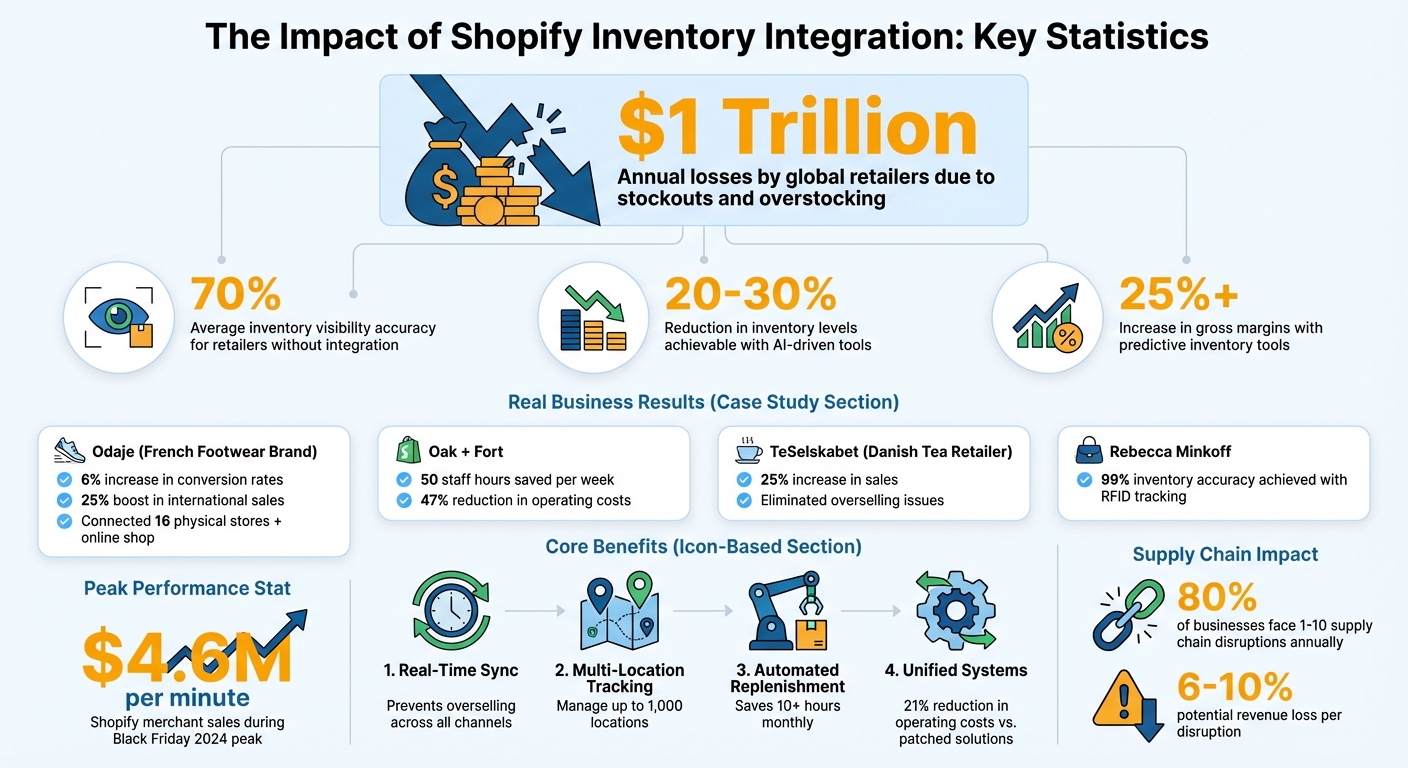
Shopify Inventory Integration Benefits and Impact Statistics
Shopify Inventory Integration Fundamentals

What is Inventory Integration?
Inventory integration is the process of syncing your stock data across all the platforms and locations where you sell - whether that's your Shopify store, physical retail spaces, marketplaces like Amazon, or social platforms like TikTok Shop. Instead of manually updating stock levels, this integration ensures real-time updates whenever products are received, sold, or returned. For example, if someone buys a pair of sneakers online, the stock count automatically adjusts across every sales channel.
The biggest advantage? Speed and accuracy. On average, retailers only have accurate inventory visibility about 70% of the time. This can lead to overselling or missed sales opportunities. By integrating inventory, you create a single, real-time source of truth that updates with every transaction. Plus, your team can focus on growing the business instead of spending hours manually managing stock data.
Let’s dive into the core components that make Shopify’s inventory integration so effective.
Core Components of Shopify Inventory Integration
Shopify’s built-in inventory tracking acts as the foundation for a streamlined stock management system. It allows you to track inventory across up to 1,000 locations and warehouses, offering a centralized view of where every product is located. Inventory is categorized into various states, such as:
- Available: Ready for sale.
- Committed: Allocated to unfulfilled orders.
- On hand: Physically present in stock.
- Incoming: In transit from suppliers.
Additionally, there are states that mark items as unavailable, like damaged, reserved, safety_stock, or quality_control. This level of detail helps avoid phantom inventory - products that show up in your system but don’t actually exist.
For businesses that need more advanced features, third-party platforms can enhance Shopify’s native tools. These integrations handle tasks like automating purchase orders, managing stock transfers between warehouses, and creating audit trails that link inventory changes to specific documents. They’re especially useful for managing high-volume transactions or handling sudden spikes in demand.
Travis Boyce, Head of Global Retail Operations at Allbirds, highlighted the importance of having unified systems:
"With Shopify Plus, we have our point-of-sale and ecommerce systems under one umbrella, which serves our ultimate purpose of being an omnichannel retailer and viewing the customer as one customer - no matter where they shop with us".
Another critical shift is moving from periodic to perpetual inventory tracking. Periodic systems rely on occasional manual counts and are prone to discrepancies, or "data drift." Perpetual systems, on the other hand, update inventory levels automatically with every transaction. This is essential for modern retail strategies like buy online, pick up in store (BOPIS). By connecting inventory data across all channels, you can avoid the costly mistakes that come from outdated spreadsheets or disconnected systems.
Best Practices for Shopify Inventory Integration
Real-Time Inventory Synchronization
Keeping your inventory synced in real time is critical. Why? Because delays in updating stock levels can lead to overselling, unhappy customers, and revenue loss. In fact, 80% of businesses deal with one to ten supply chain disruptions annually, with each disruption potentially cutting 6% to 10% of their yearly revenue. When your Shopify store, Amazon listings, Instagram Shop, and physical locations all rely on the same live data, you maintain accurate stock visibility across every channel.
To make this happen, integrate tools like barcode or RFID scanning at every point - whether you're receiving, selling, or processing returns. This cuts down on manual errors and ensures your inventory updates instantly. Alexandra McNab, COO of Bared Footwear, highlighted the benefits of unified data:
"Having all our tooling and commerce data unified in a single platform was a real driving factor. All our sales channels display the same stock availability, and we can run a promotion online and in-store concurrently without worrying about overselling".
Take Odaje, a French footwear brand, as an example. By connecting inventory data across 16 physical stores and their online shop using Shopify, they achieved a 6% increase in conversion rates and boosted international sales by 25%. Real-time inventory visibility ensures customers see accurate stock levels while your team can fulfill orders from any location - no manual stock checks needed.
Automating Inventory Replenishment
Manually reordering stock is time-consuming and prone to error, often causing either stockouts or excess inventory. Automating this process can save time and money. Set up reorder points - thresholds that trigger purchase order drafts when stock levels dip below a certain number. For example, if a product sells 50 units per week and your supplier takes two weeks to deliver, set a threshold of at least 100 units plus a safety buffer.
Shopify Flow can help streamline this. For instance, when a popular item hits its reorder point, the system can automatically draft a purchase order and notify your purchasing team via Slack. Oak + Fort used this approach to unify their retail operations, saving 50 staff hours per week and slashing operating costs by 47%.
To maximize efficiency, apply ABC analysis to focus on your most important stock. Typically:
- "A" items generate 80% of your revenue,
- "B" items contribute about 15%, and
- "C" items make up the remaining 5%.
Prioritizing automated replenishment for A and B items ensures your bestsellers stay in stock while avoiding overstocking slower-moving products. Once automation is in place, rigorous testing ensures the system works reliably and without errors.
Testing and Validating Data Before Launch
Before rolling out any inventory integration, thorough testing is a must. Simulate real-world scenarios like sales, returns, and stock transfers to confirm that your inventory levels - such as "available", "committed", and "on-hand" quantities - update correctly across all locations. Shopify's API tools, like referenceDocumentUri, can help link inventory changes to specific documents, such as purchase orders or customer returns.
TeSelskabet, a Danish tea retailer, successfully implemented a system that synced product categories and bundles between their POS and ecommerce platforms. By testing their sync logic before launch, they avoided overselling and saw a 25% increase in sales. Start small by testing with a limited number of SKUs, and only scale up once you're confident everything works as expected.
Make sure to test under various conditions - high sales days, simultaneous orders across channels, and partial supplier shipments. This ensures your system can handle the complexities of real-world operations without creating errors or phantom inventory issues.
Advanced Strategies for Scaling Inventory Management
Demand Forecasting and Analytics
Scaling inventory management becomes much smoother with advanced demand forecasting. At scale, accurate predictions of demand are a game-changer, especially when handling large and diverse product catalogs. Tools powered by AI can analyze specific demand trends, making it easier to meet customer needs without adding unnecessary complexity to operations.
Modern analytics take it a step further by blending historical data with external influences like weather, pricing shifts, and market trends. This approach allows businesses to scale efficiently, as AI automates complex decisions, reducing the need for additional manpower.
Forstock offers a prime example of how AI can simplify inventory scaling. Its forecasting tools adapt to market trends, automate reorder points, and create 12-month demand plans based on data. Integrated with Shopify, Forstock automatically sets reorder levels and generates purchase orders, keeping stock aligned with business growth - all without manual input. Retailers using AI-driven tools often see a 20% to 30% reduction in inventory levels while boosting gross margins by 25% or more.
These predictive tools also make managing multiple locations far more efficient.
Managing Multiple Warehouses
Expanding to multiple warehouses introduces new challenges, but centralized inventory control can make all the difference. A single platform to monitor stock across all locations - retail stores, warehouses, and even temporary pop-ups - helps prevent both stockouts and overstocking. Pierre Asteix, Operations Director at Weebot, highlighted the value of real-time visibility:
"Shopify POS gives us real-time visibility into stock and operations. Our team can see exactly where a product is and manage transfers easily, which has been essential for running four service centers smoothly".
To streamline order fulfillment, set priorities for routing orders to the warehouse closest to the customer. This reduces shipping costs and delivery times. Automated systems can even split orders when needed, ensuring efficient delivery. Additionally, maintaining buffer stock at high-demand locations helps safeguard against unexpected spikes in demand or supplier delays.
Brands like Allbirds have successfully unified their in-store and online systems using Shopify Plus, enabling them to optimize stock levels and operate with less retail space. Similarly, Rebecca Minkoff achieved 99% inventory accuracy by using RFID tags to track inventory upon arrival, a significant improvement over manual tracking methods.
Centralized control is just the start - categorizing and prioritizing inventory adds another layer of efficiency.
Inventory Categorization and Prioritization
Organizing inventory through ABC analysis ensures that resources are focused where they matter most. By setting tiered reorder points, you can maintain higher thresholds for "A" items (your top performers) to avoid stockouts, while keeping leaner stock levels for "C" items to save on storage costs. Monthly cycle counts for the top 20% of revenue-driving products help catch discrepancies early.
To further optimize, store fast-moving items in easily accessible areas and prioritize them during restocking cycles. Keeping higher safety stock for these critical items protects against supplier delays or sudden demand surges. A helpful formula for calculating safety stock is:
(Maximum daily sales × maximum lead time) − (Average daily sales × average lead time).
sbb-itb-f0fc809
Choosing the Right Inventory Integration Tool
Features to Look for in an Integration Tool
The right inventory integration tool can turn managing stock from a logistical nightmare into a seamless process. At its core, your system should offer real-time synchronization, ensuring stock levels are updated instantly across all sales channels. Without this, you risk overselling - especially during high-demand periods like Black Friday, when Shopify merchants hit a peak of $4.6 million in sales per minute in 2024.
Another critical feature is multi-location management, which lets you track inventory across warehouses, retail stores, and fulfillment centers from a single dashboard. This centralized approach ensures you maintain control, no matter how complex your operations become.
Tools with intelligent order routing are a must. These systems automatically direct orders to the warehouse closest to the customer, cutting shipping costs and speeding up delivery times. Additionally, platforms with AI-powered demand forecasting stand out. These tools analyze historical sales data, seasonal trends, and market shifts to predict inventory needs weeks or even months in advance. This can reduce your inventory levels by 20% to 30% while still meeting customer demand. Automated reorder points and purchase orders based on data-driven thresholds further simplify inventory management.
Integration capabilities also matter. Look for tools with clean APIs that work seamlessly with ERP systems like NetSuite or Microsoft Dynamics. A unified commerce architecture built on a single codebase can reduce operating costs by about 21% compared to patchy middleware solutions. Finally, the tool must feature an intuitive dashboard that new users can master in minutes.
For an option that checks all these boxes, keep reading to discover how Forstock can transform your inventory management.
How Forstock Simplifies Inventory Management
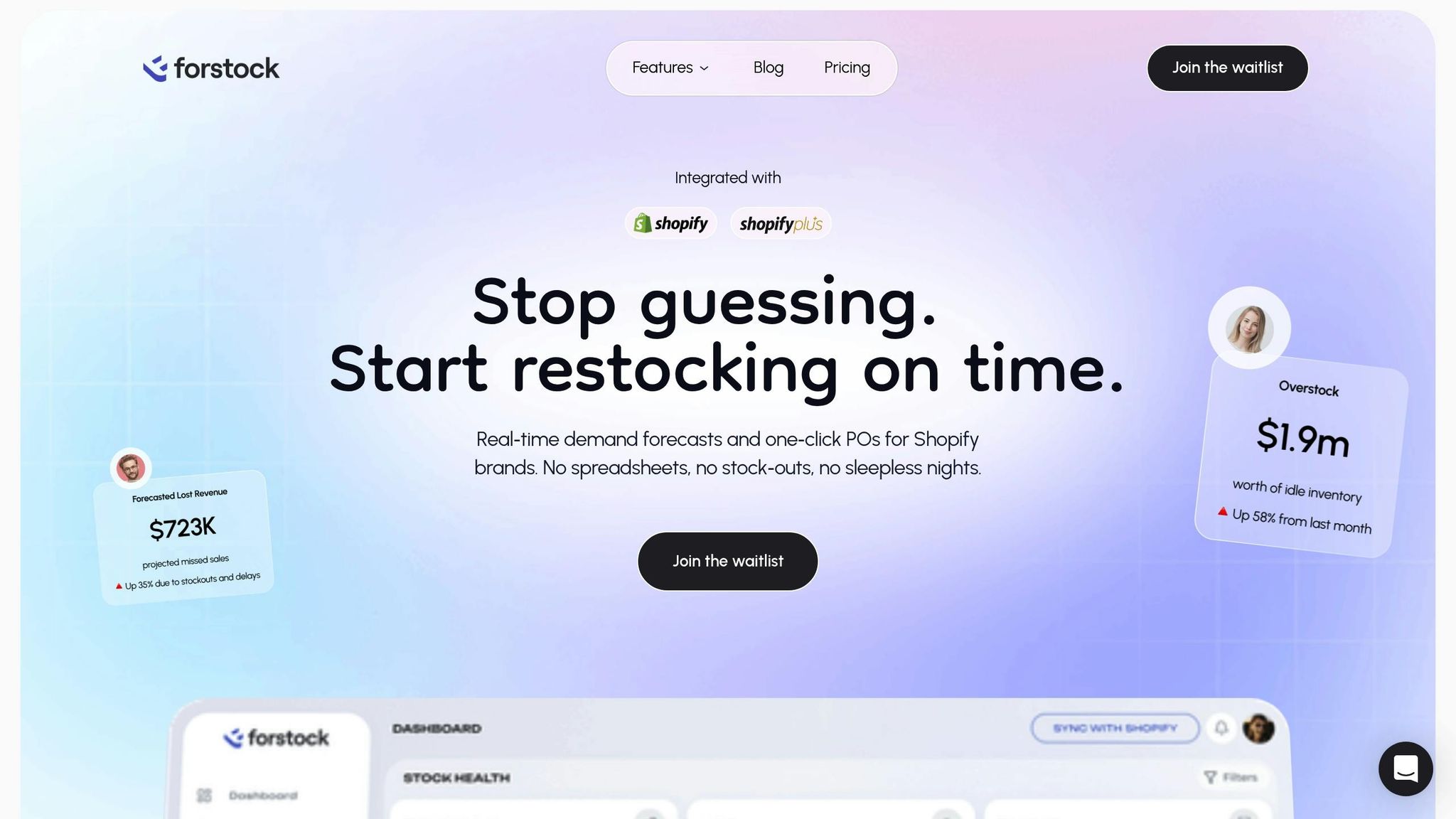
Forstock is designed to tackle the challenges of scaling inventory for Shopify merchants. Its real-time dashboard syncs stock levels instantly across all locations, eliminating the need for manual updates. Fully integrated with Shopify, Forstock acts as a unified inventory hub.
The platform’s AI-driven demand forecasting ensures you’re always prepared, automating reorder points and preventing costly stockouts or overstock situations - issues that cost retailers nearly $1 trillion annually. By analyzing sales trends, lead times, and seasonal fluctuations, Forstock generates 12-month demand plans that take the guesswork out of purchasing decisions.
Forstock also simplifies supplier management. Instead of juggling emails and spreadsheets, you can track purchase orders, coordinate deliveries, and manage supplier relationships all in one place. This approach fosters better supplier partnerships through accurate and predictable ordering patterns. Plus, the system scales effortlessly, handling everything from simple SKUs to complex multi-variant catalogs without requiring extra staff.
With a flat rate of $39 per month - regardless of your revenue tier - Forstock offers a straightforward pricing structure, avoiding the headaches of tiered pricing. A 14-day free trial and live-chat support let you test the platform risk-free. For Shopify brands aiming to save time, boost cash flow, and scale with confidence, Forstock provides the automation and intelligence needed for sustainable growth.
Shopify Inventory Management Made Simple - Tips That Actually Work in 2025
Conclusion
Scaling your Shopify inventory doesn’t have to involve juggling endless spreadsheets or hiring more staff. The secret lies in real-time synchronization across all your sales channels - whether it’s online, in-store, or marketplaces. This approach not only prevents overselling but also helps maintain the trust of your customers. In fact, businesses that have embraced these integrations have seen higher conversion rates and expanded their reach globally.
Automation takes inventory management from being a tedious manual task to a powerful strategic tool. By automating reorder points and leveraging AI-powered tools for creating purchase orders, you can eliminate human errors and save over 10 hours each month. Advanced analytics allow retailers to cut inventory levels by 20% to 30% without compromising their ability to meet customer demand. And when you consider that global retailers lose nearly $1 trillion annually due to stockouts and overstocking, this kind of efficiency is a game-changer.
Choosing the right integration tool is just as important. Look for platforms that offer demand forecasting, multi-location management, and seamless Shopify integration. Forstock, for example, provides these features for a flat $39 per month, regardless of your revenue. Their AI-driven 12-month demand plans take the guesswork out of purchasing, making it easier to stay ahead of demand.
At the heart of scalable inventory management are consistent real-time data and automated systems. Centralizing your data, implementing automated workflows, and using methods like ABC analysis to prioritize inventory can significantly boost efficiency and support sustainable growth. With a 14-day free trial and live-chat support, modern inventory tools like these make it easier than ever to streamline your operations and improve profitability.
FAQs
How does real-time inventory syncing help prevent overselling on Shopify?
Real-time inventory syncing ensures your stock levels are updated immediately across all your Shopify sales channels whenever a purchase occurs. This means your inventory data stays accurate, reducing the risk of customers ordering items that are already out of stock.
Keeping inventory records current helps you avoid overselling, which can lead to disappointed customers. It also boosts customer satisfaction and strengthens trust in your brand. Plus, it simplifies your operations by cutting down on manual updates and reducing stock management errors.
What are the advantages of automating inventory replenishment for a Shopify store?
Automating inventory replenishment can be a game-changer for Shopify stores. It ensures you always have the right products in stock to meet customer demand, helping you avoid stockouts that could lead to lost sales. At the same time, it keeps your inventory lean by cutting down on excess stock, which means more cash flow and less storage space taken up by unsold items.
Automation also simplifies your purchasing processes and sharpens demand forecasting, making your operations smoother and more efficient. This not only reduces errors and delays in your supply chain but also gives you the freedom to focus on scaling your business without getting bogged down by manual tasks.
How do demand forecasting tools help streamline inventory management?
Demand forecasting tools are a game-changer for businesses looking to fine-tune their inventory management. By analyzing historical data, seasonal patterns, and market conditions, these tools predict future sales trends. This helps businesses keep the right amount of stock on hand, reducing the chances of running out of inventory or ending up with too much.
What sets modern demand forecasting apart is the use of AI. These advanced systems adjust to shifts in consumer behavior and supply chain changes, making purchasing decisions more precise. Tasks like setting reorder points or generating purchase orders can be automated, saving time and helping businesses manage cash flow more effectively. Plus, maintaining optimal stock levels keeps customers happy by ensuring products are always available.
In short, demand forecasting helps businesses grow by making inventory decisions smarter and more efficient.


.png)
.png)
.png)
.svg)